The first release of the Physical AI Leaderboard. Four leading VLA models –
OpenPI, GR00T, SmolVLA, ACT – evaluated on bin-to-bin order picking with
four IKEA-sourced object classes, on a Franka Research 3 with a Robotiq 2F-85
gripper, under a blinded, randomized protocol. All data, model weights,
evaluation framework, and the full reproduction recipe are public.
How researchers use this
v1.0 supports three workflows: use the public data directly, run the
evaluation framework on your own rig, or submit a checkpoint for managed
evaluation.
Fine-tuning dataset
352 VR-teleoperated demonstrations across the four object classes (~12 GB).
The standardized baseline all four evaluated models were fine-tuned on.
uv run --with positronic \
  python -m positronic.cfg.phail.v1_0
The full v1.0 evaluation protocol is documented in the
v1.0 white paper.
Summary of what's relevant for reproducibility:
A session is run by a single human evaluator. For each episode:
The evaluator places the outbound tote on the left or right of the
table, places the exterior camera on the left or right, and loads N
items of one object class into the inbound tote.
The system selects which checkpoint to run via a
BalancedSampler
– it weights selection toward under-represented (model, configuration)
cells. The operator never sees model identity during evaluation; it
lives only in the recorded run log.
The evaluator presses Start. The model runs autonomously
at 15 Hz, receiving wrist + exterior camera frames, end-effector
pose, and the unified language prompt. Each vendor uses its own codec
– some absolute EE pose, some joint deltas, some other variants;
positronic mediates between the codec and the FR3 control interface.
The episode ends on one of: operator Stop (success path),
operator Safety Stop (physical risk – typically items
about to fall off the table), or timer expiry
(Ran out of time, at 30 s × N). A System
outcome exists for irrecoverable controller errors but did not occur in
practice in v1.0.
The evaluator records outcome and successful item count.
In v1.0 the operator's role is intentionally minimal: they call safety stop
only when items risk falling, and otherwise wait for the timer. The
dominant non-success outcome is therefore Ran out of time, not a
functional failure call. v1.1+ will replace operator-driven termination with
scale-based automated success detection.
Metrics (canonical definitions in the white paper):
UPH – units per hour, averaged equally across object classes.
MTBF/A – total evaluation time / number of failed runs, where a failed run is any outcome ≠ Success. (PhAIL does not separately distinguish MTBF from MTBA.)
Completion – fraction of items successfully moved, averaged equally across object classes.
Compute topology for v1.0. ACT and SmolVLA inference ran on
a GPU notebook physically connected to the robot. GR00T ran on a separate
machine on the same local network as the notebook.
OpenPI requires ≥70 GB VRAM, which exceeded the
notebook's capacity – it was therefore served from Nebius
eu-north1 (Finland), while the robot and notebook are in Cyprus.
The OpenPI numbers therefore include Cyprus → Finland round-trip latency
on every inference request; reproducers either replicate the cross-continent
arrangement or should expect throughput shifts when changing it.
Hardware & fixtures
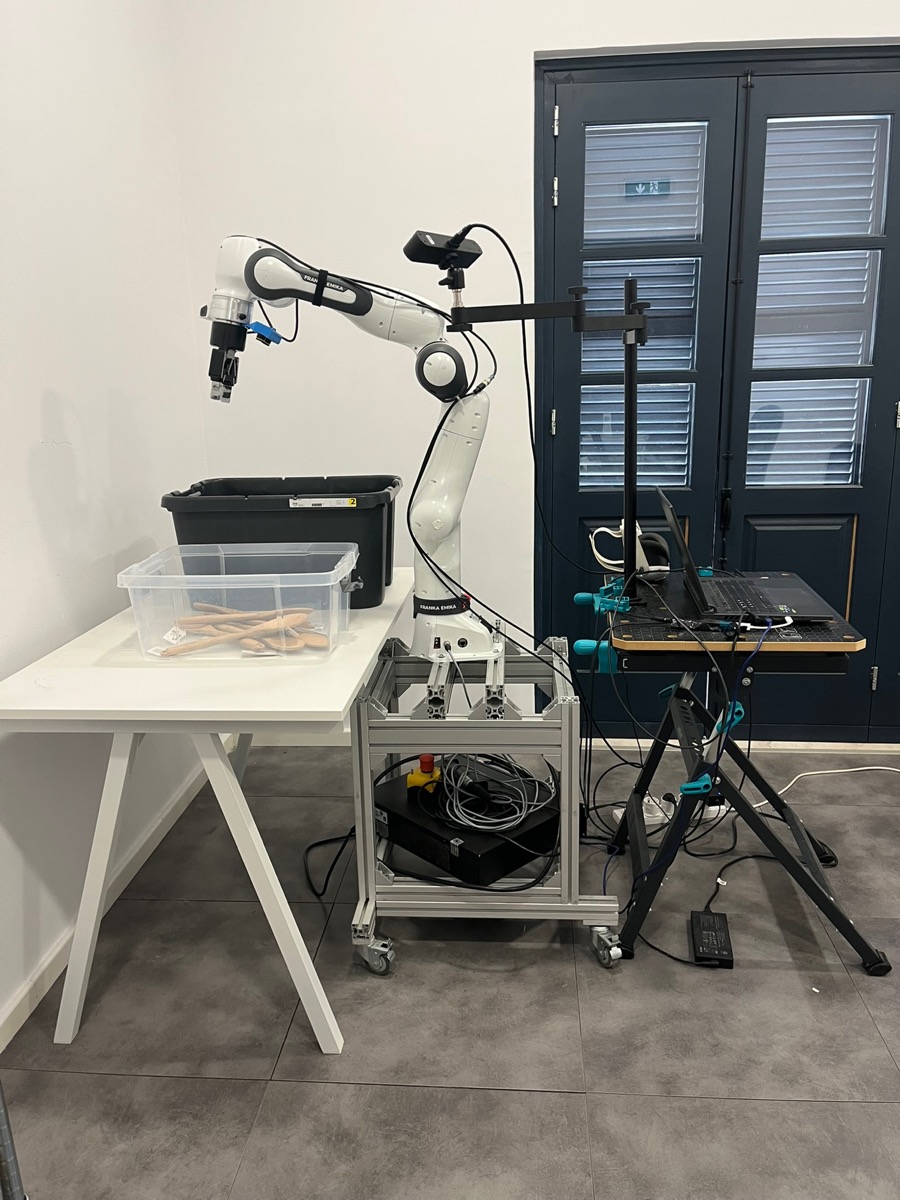
The station is a single mobile workcell: a Franka Research 3 arm on a
custom aluminum-extrusion frame with caster wheels, so the whole rig can
be rolled into position without re-calibrating against its fixtures. The
arm carries a Robotiq 2F-85 parallel gripper, mounted via the
DROID
hardware convention (which also fixes the wrist-camera placement).
Two Stereolabs ZED cameras feed the policy server at 720p, 30 fps with
on-chip image enhancement: a ZED Mini bolted to the wrist, and a ZED 2i
fixed to a separate stationary desk that also holds the controller laptop.
Only the left view of each stereo pair is used as input.
The two storage totes sit on a plain table (IKEA Trotten
120 × 70 cm, article 294.249.42), and the arm's
mobile base is rolled into position next to it before each session.
Tote positions on the table are deliberately not fixed. At the start of
each session the evaluator places both totes wherever there's room on the
surface – the benchmark measures whether a policy can find the totes,
not whether it has memorized their coordinates.
Destination (grey) tote: IKEA KLAMTARE box with lid, article 702.923.64.
The four manipulation tasks each use a single IKEA-sourced object class:
Task
Object
IKEA article
Towels
RINNIG kitchen towel, 45 × 60 cm (pack of 4)
204.763.46
Wooden spoons
RÖRT round wooden spoon
402.784.68
Scissors
MANOGA stainless steel scissors
005.634.29
Batteries
LADDA AA HR6 1.2 V 1900 mAh rechargeable Ni-MH
005.098.14
The evaluator places a known count of items into the source tote at episode
start; that count is part of the recorded episode metadata, not derived
after the fact.
FR3 controller runs Control 5.8.1; the Robotiq 2F-85
firmware version is not recorded for v1.0. ZED SDK 5.0.
The v1.0 workcell. The FR3 on its aluminum-extrusion mobile base is rolled into position next to the table; the JUMBO source tote (front, transparent) and KLAMTARE destination tote (back, grey) sit on it. The separate stand on the right holds the exterior ZED 2i, the controller laptop, and the VR teleop controllers used for the fine-tuning dataset.
Models evaluated
Four VLAs, fine-tuned from public base checkpoints on the v1.0
teleoperation dataset, each served from a vendor-specific docker
image:
positro/openpi:v0.2.1
(OpenPI π0.5),
positro/gr00t:v0.2.1
(NVIDIA GR00T N1.6),
and
positro/positronic:v0.2.1
(Hugging Face SmolVLA and Action Chunking Transformer).
Pin IMAGE_TAG=v0.2.1 for the v1.0 release. Run each
vendor server from the base
docker-compose.yml
with the public checkpoint path explicitly overridden:
cd positronic/docker

# OpenPI π₀.₅  (≥70 GB VRAM)
IMAGE_TAG=v0.2.1 docker compose run --service-ports openpi-server phail \
  --checkpoints_dir=s3://positronic-public/phail/v1.0/models/openpi/

# NVIDIA GR00T N1.6
IMAGE_TAG=v0.2.1 docker compose run --service-ports groot-server phail \
  --checkpoints_dir=s3://positronic-public/phail/v1.0/models/gr00t/

# Hugging Face SmolVLA
IMAGE_TAG=v0.2.1 docker compose run --service-ports lerobot-server phail \
  --checkpoints_dir=s3://positronic-public/phail/v1.0/models/smolvla/

# Action Chunking Transformer
IMAGE_TAG=v0.2.1 docker compose run --service-ports lerobot-0_3_3-server phail \
  --checkpoints_dir=s3://positronic-public/phail/v1.0/models/act/
Each server is reachable on port 8000 inside its container; use
--service-ports to map it on the host, or
docker --context <host> compose ... to deploy to a
remote machine.
Reproduce inference rollouts on a comparable rig
With the rig from Hardware & fixtures
and the four servers from Models evaluated
running, drive the FR3 with the positronic client at the same pinned
tag.
The canonical v1.0 invocation, extracted from a session's
run_metadata_*.yaml:
cd positronic/docker

IMAGE_TAG=v0.2.1 docker compose run --rm positronic-inference phail \
  [email protected]_multiple \
  --policy.sampler.balance=0.5 \
  --output_dir=<your-output-dir>
The
phail_multiple policy config
defaults the per-vendor servers to smolvla:8000,
act:8001, groot:8000, openpi:8000
on hostnames matching our internal lab network. Override them on the CLI
to match yours:
For non-docker invocation, check out
positronic at the v0.2.1 tag
and run uv run positronic-inference phail ... with the same
flags. The
positronic README
covers the broader wire-up of robot driver, gripper, cameras, and policy
servers.
Questions
Anything unclear, missing, or worth fixing? Email
[email protected].